Jump to the handoff template · Compare your options
1. Save the work you have already done
Do not start a replacement project or ask another assistant to recreate everything. The useful handoff is your current source, unfinished task and verification results.
- Save your editor buffers. Record the project folder, branch and where this task actually changed files. Cloud work and your local checkout may not match yet.
- Review the changes. The read-only commands below distinguish unstaged edits, staged files and new files.
- Keep a checkpoint. After checking for secrets and unrelated files, commit the intended changes using your normal Git workflow. If a commit is premature, make a complete project backup, including new files.
- Keep the failure evidence. Record the first relevant build error, failing test, unfinished behavior and the next check to run.
git status --short
git diff --stat
git diff --name-only
git diff --cached --name-only
If a task is still writing files, let it finish or stop it deliberately before taking a stable checkpoint. These commands do not make a backup; pay particular attention to untracked files in the status output.
2. Identify the limit before changing your workflow
Weekly limits may apply. Your usage dashboard shows current capacity and reset times; /status exposes usage in Codex CLI. Eligible accounts can buy additional credits or use an available reset shown in their account. Do not assume someone else’s options, message count or reset day applies to you. [1] [6]
ChatGPT Work and Codex share usage limits. Moving to Work is not a fresh allowance. To continue in Chat, separately check your chosen model’s available usage and tool support; do not infer its status from the Codex balance. Features depend on your plan, platform and workspace settings. [1] [3]
API-key usage is billed separately through OpenAI Platform. It supports local workflows, with some ChatGPT-dependent features limited. Check access and budget before switching. [2]
3. Choose a path that moves the project forward
| Option | Best fit | Next step |
|---|---|---|
| Wait and keep working locally | You can wait and want to retain the current Codex session | Review the diff, reproduce the bug, run a local build and define acceptance. |
| Check an available reset | Your account shows a banked reset or an eligible paid instant reset offer. | Review coverage, expiry and any price. A banked reset can be saved until expiry; a paid instant reset applies immediately, cannot be saved or scheduled, and changes the weekly refresh schedule. Neither is a credit purchase. Check your account for eligibility. Banked resets · Paid resets |
| Check the additional-credit option | You want to stay with the same development tool | Check eligibility, price and coverage in your account. [1] |
| Use an API-backed local workflow | You accept separate metered billing | Review authentication, feature differences and budget; this does not refill the subscription. [2] |
| Continue Xcode with Chat + Relayard | Your saved checkout is on the Mac and your Chat model has usage and tool support | Start at the current Mac download page; check requirements, authorize the intended project and verify a read before editing. |
| Finish one small step manually | No suitable AI tool is available right now | Fix a specific compiler error, add an empty state or verify an implemented feature. |
After a paid reset, the new weekly window begins with your next Work or Codex request; the next automatic refresh is seven days after that request, not seven days after payment. Other resets, including banked resets, can also change refresh timing. Check the updated account notice; the subscription billing date is unchanged. [4] [5]
Relayard is for a local Xcode project. If you only have a remote Linux project, no Mac, or no usable Chat tool connection, the other paths above are more direct.
4. Copy this handoff instead of starting over
You can fill this in from your files, Git status and latest logs even if Codex cannot reply. Leave out secrets, signing certificates and production data.
Continue my existing iOS / macOS app from this checkpoint.

Project / workspace: [exact name and local folder]
Branch / last commit: [branch and commit]
Work location: [main checkout / worktree / recovered cloud changes]
Xcode scheme / target / destination: [exact names]
Goal: [the user-visible outcome]
Already done: [completed changes and relevant files]
Still unfinished: [remaining work]
Latest build / test: [command or action, result, first relevant error]
Uncommitted / untracked files: [reviewed list]
This task only: [one change or one failing check]
Acceptance: [observable behavior + build / test result]
Keep unchanged: [navigation, storage format, signing, dependencies]

First confirm the bound project and available tools. Read the relevant
files without changing anything; compare them with this handoff.
Then propose the smallest patch. Use only approved edit and execution
tools. Review the diff and report completed checks, failures and anything
not verified. Stop if the project binding or permissions do not match.
5. Continue the same Xcode project with Relayard
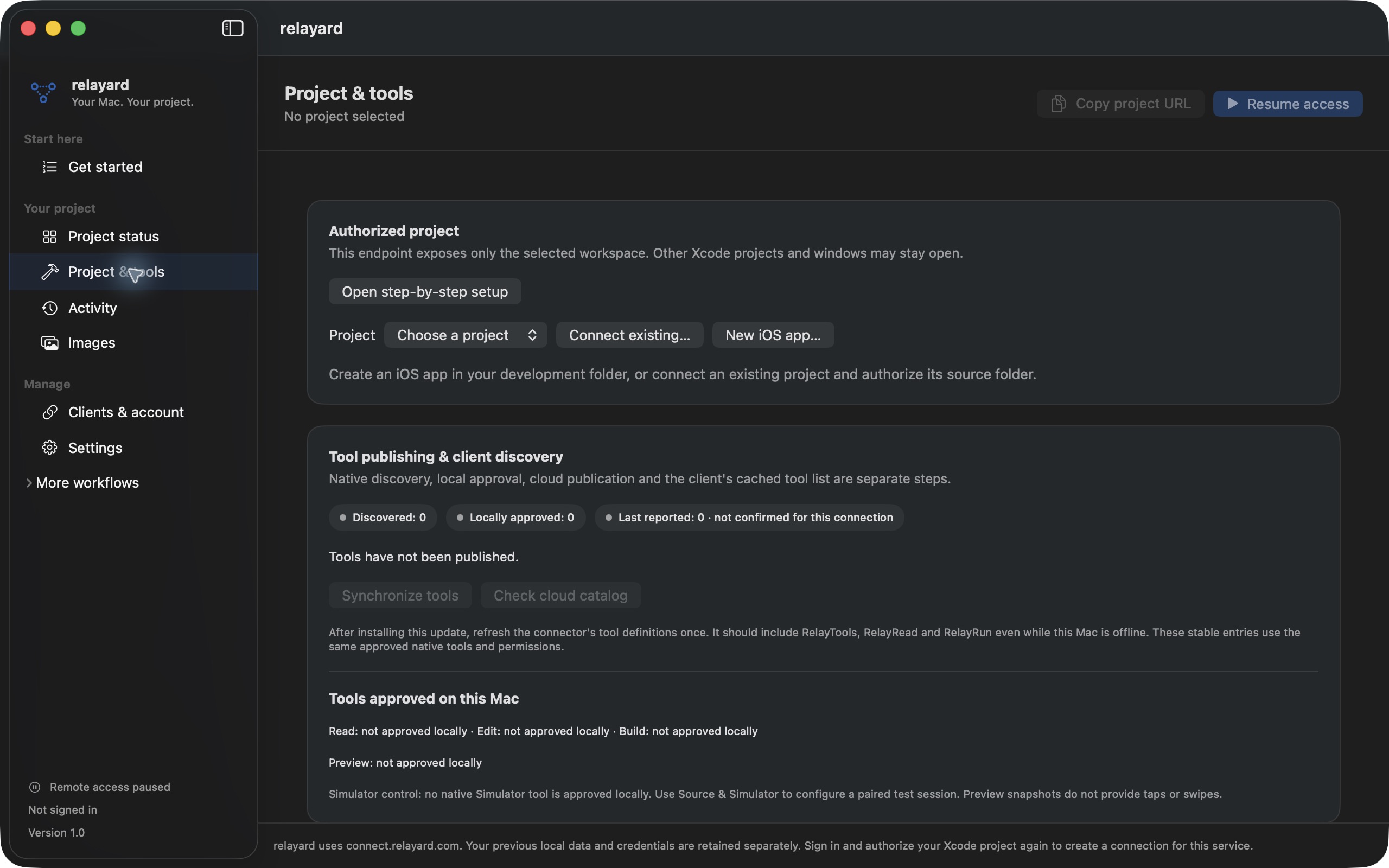
Relayard is a native macOS app and hosted MCP relay. It connects an authorized AI client to the Xcode project you select on your Mac. For a half-finished app, the useful part is letting the assistant inspect real files and verify changes in that project.
- Confirm the exact checkout. Open the copy containing Codex’s edits and confirm the scheme and target. A matching project name does not prove you are in the right worktree.
- Connect your tools. If you have the app, follow the connection guide: select the project, connect Xcode, review tools and authorize the client with OAuth.
- Verify one read first. Ask ChatGPT to report the bound project and available tools, then read a recently changed file and compare it with your handoff.
- Finish one verifiable step. With edit access approved, apply a focused change and build through the available tools. Run relevant tests or request a Preview when supported; inspect the actual results and remaining issues.
Builds run on your Mac. Requested source excerpts, logs and images pass through the hosted relay and AI client. Read the permissions and data-flow guide. Tool support depends on Xcode, the client and local authorization.
6. Make the next task small enough to verify
Suppose favorites are half built: the list has changed, but saved state and the empty state are unfinished. Avoid combining “finish the app, refactor everything and polish the UI” into the handoff.
A clearer next task: persist favorites using the existing storage pattern and verify that they survive a restart. Get a successful build, then handle the filtered empty state separately. End each task with changed files, check results and one next step.
This is a planning example, not a completed Relayard customer case. A message is not a guaranteed unit of release work.
Ready to refine the UI? Fine-tune SwiftUI visually in Chat.
Why put Chat Pro to work? Separate usage and a plan for complex development.
Frequently asked questions
Will I lose my code when Codex runs out of usage?
First inspect what was actually saved. Files on your Mac can still be opened in Xcode. If work happened in a cloud task or another worktree, bring its reviewed changes into the checkout you intend to continue. A chat summary alone is not a copy of the code.
When does my Codex weekly limit reset?
Check the usage dashboard or the reset notice for your account. Use that timestamp rather than assuming a universal Monday reset. The official usage page is linked below.
Can I continue an unfinished Codex project with ChatGPT?
Yes, when the selected Chat model is available to your account and supports the work you need. For direct access to a local Xcode project, Relayard also needs a working MCP / OAuth connection and locally approved tools. If those tools are unavailable, use Chat to review pasted code or prepare the next change for manual application.
Does Relayard bypass the Codex weekly limit?
No. Relayard connects an authorized AI client to your Mac’s Xcode tools. It does not reset Codex, add model credits or guarantee access to Chat. Verify the selected model’s remaining usage before connecting.
Will Relayard import my Codex conversation automatically?
No. Provide the handoff below and let the client read the actual project. Include the branch, completed work, current failure and one small acceptance target.
Can I install Relayard and continue immediately?
Start at the current Mac download page and check its requirements. Install the app, authorize the intended project and verify a read-only request. Your selected Chat model must have available usage and support the required tools. Relayard does not restore Codex usage or transfer a conversation automatically; bring a handoff and check the actual saved files before editing.
Sources, authorship and updates
Written by Relayard. Usage, reset and authentication references were checked against official documentation on October 26, 2026. The checkpoint, handoff template and task-scoping advice are our workflow recommendations. Product setup details follow our existing documentation.
- OpenAI: Codex / Work pricing and usage
- OpenAI: authentication and API billing
- OpenAI: Chat, Work and Codex
- OpenAI: banked resets and how resets work
- OpenAI: paid weekly Work and Codex resets
- OpenAI: Codex plan limits and account options
Rules can change; use your account display and current official documentation. Relayard is independent of OpenAI and Apple.